HTML form
A webform, web form or HTML form on a web page allows a user to enter data that is sent to a server for processing. Forms can resemble paper or database forms because web users fill out the forms using checkboxes, radio buttons, or text fields. For example, forms can be used to enter shipping or credit card data to order a product, or can be used to retrieve search results from a search engine.
Description
forms are enclosed in the HTML form element. This element specifies the communication endpoint the data entered into the form should be submitted to, and the method of submitting the data, GET or POST
Elements
Forms can be made up of standard graphical user interface elements:
text — a simple text box that allows input of a single line of text.
email - a type of that requires a partially validated email address
number - a type of that requires a number
password — similar to , it is used for security purposes, in which the characters typed in are invisible or replaced by symbols such as *
radio — a radio button
file — a file select control for uploading a file
reset — a reset button that, when activated, tells the browser to restore the values to their initial values.
submit — a button that tells the browser to take action on the form (typically to send it to a server)
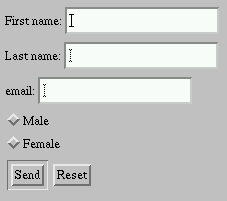
The sample image on the right shows most of these elements:
a text box asking for your name
a pair of radio buttons asking you to pick your sex
a select box giving you a list of eye colors to choose from
a pair of check boxes to click on if they apply to you
a text area to describe your athletic ability
a submit button to send it to the server
These basic elements provide most common graphical user interface (GUI) elements, but not all. For example, there are no equivalents to a tree view or grid view.
A grid view, however, can be mimicked by using a standard HTML table with each cell containing a text input element. A tree view could also be mimicked through nested
tables or, more semantically appropriately, nested lists. In both cases, a server-side process is responsible for processing the information, while JavaScript handles
the user-interaction. Implementations of these interface elements are available through JavaScript libraries such as jQuery.
HTML 4 introduced the
number - a type of
password — similar to
radio — a radio button
file — a file select control for uploading a file
reset — a reset button that, when activated, tells the browser to restore the values to their initial values.
submit — a button that tells the browser to take action on the form (typically to send it to a server)
The sample image on the right shows most of these elements:
a text box asking for your name a pair of radio buttons asking you to pick your sex
a select box giving you a list of eye colors to choose from
a pair of check boxes to click on if they apply to you
a text area to describe your athletic ability
a submit button to send it to the server These basic elements provide most common graphical user interface (GUI) elements, but not all. For example, there are no equivalents to a tree view or grid view.
A grid view, however, can be mimicked by using a standard HTML table with each cell containing a text input element. A tree view could also be mimicked through nested tables or, more semantically appropriately, nested lists. In both cases, a server-side process is responsible for processing the information, while JavaScript handles the user-interaction. Implementations of these interface elements are available through JavaScript libraries such as jQuery.
HTML 4 introduced the
Submission
When data that has been entered into HTML forms is submitted, the names and values in the form elements are encoded and sent to the server in an HTTP request message using GET or POST. Historically, an email transport was also used. The default MIME type (internet media type), application/x-www-form-urlencoded, is based on a very early version of the general URI percent-encoding rules, with a number of modifications such as newline normalization and replacing spaces with "+" instead of "%20". Another possible encoding, Internet media type multipart/form-data, is also available and is common for POST-based file submissions.
Use with programming languages
Forms are usually combined with programs written in various programming language to allow developers to create dynamic web sites. The most popular languages include both client-side and/or server-side languages. Although any programming language can be used on the server to process a form's data, the most commonly used languages are scripting languages, which tend to have stronger string handling functionality than programming languages such as C, and also have automatic memory management which helps to prevent buffer overrun attacks.
Client-side
The de facto client-side scripting language for web sites is JavaScript. Using JavaScript on the Document Object Model (DOM) leads to the method of Dynamic HTML that allows dynamic creation and modification of a web page within the browser.
While client-side languages used in conjunction with forms are limited, they often can serve to do pre-validation of the form data and/or to prepare the form data to send to a server-side program. This usage is being replaced, however, by HTML5's new input field types and required attribute.
Server-side execution
Server-side code can do a vast assortment of tasks to create dynamic web sites that, for technical or security reasons, client-side code cannot — from authenticating a login, to retrieving and storing data in a database, to spell checking, to sending e-mail. A significant advantage to server-side over client-side execution is the concentration of functionality onto the server rather than relying on different web browsers to implement various functions in consistent, standardized ways. In addition, processing forms on a server often results in increased security if server-side execution is designed not to trust the data supplied by the client and includes such techniques as HTML sanitization. One disadvantage to server side code is scalability—server side processing for all
Interpreted languages
Some of the interpreted languages commonly used to design interactive forms in web development are PHP, Python, Ruby, Perl, JSP, Adobe ColdFusion and some of the compiled languages commonly used are Java and C# with ASP.NET.
Form-to-email scripts
Among the simplest and most commonly needed types of server-side script is that which simply emails the contents of a submitted form. This kind of script is frequently exploited by spammers, however, and many of the most popular form-to-email scripts in use are vulnerable to hijacking for the purpose of sending spam emails. One of the most popular scripts of this type was "FormMail.pl" made by Matt's Script Archive. Today, this script is no longer widely used in new development due to lack of updates, security concerns, and difficulty of configuration.